

Meta has officially introduced WhatsApp Business Usernames, allowing businesses to reserve a unique username for their WhatsApp Business API phone numbers.
Instead of asking customers to remember a phone number, they can search for or recognize your business using a memorable username like @psybug, @sendpop, or @yourbrand.
In this step-by-step guide, you’ll learn:
- What WhatsApp Business Usernames are
- Eligibility requirements
- How to reserve your username
- How to claim it using Meta Business Suite
- How to claim it using the Meta Graph API
- Common approval errors and how to fix them
- Best practices for choosing a username
What is a WhatsApp Business Username?
A WhatsApp Business Username is a unique identifier linked to your WhatsApp Business API phone number.
For example:
psybugsendpopniketesla_support
Unlike phone numbers, usernames are easier for customers to remember and improve your brand recognition across WhatsApp.
Important: Claiming a username does not hide your business phone number. Your phone number will still appear on your WhatsApp Business profile.
Who Can Claim a WhatsApp Username?
Your business must have:
- A WhatsApp Business API account
- A registered business phone number
- Access to Meta Business Suite or WhatsApp Manager
- Appropriate permissions (Full Control or Phone Number Management)
Businesses with higher messaging limits have a better chance of approval.
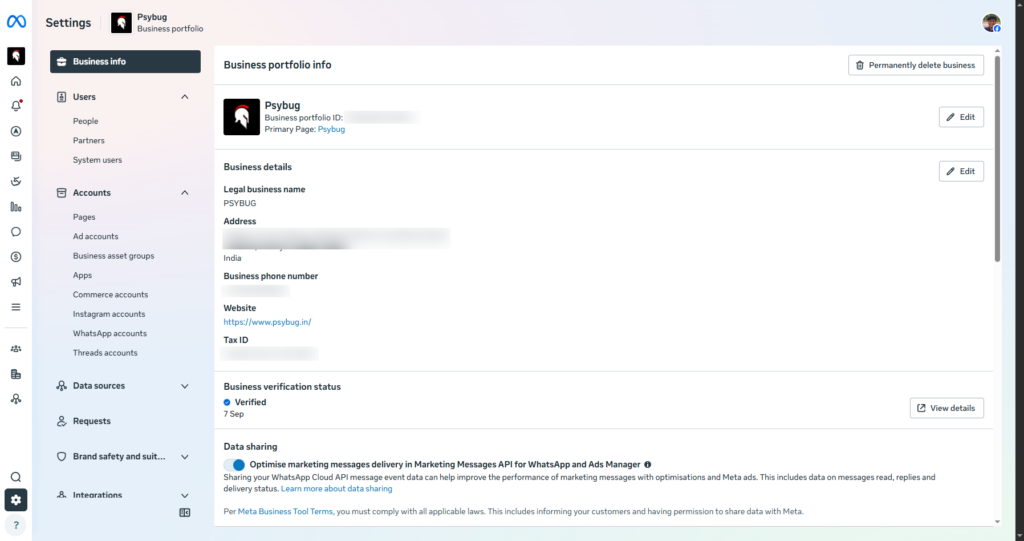
Before claiming a WhatsApp Business username, it’s recommended to complete your Meta Business Verification. Business verification helps establish ownership of your business and may be required for certain Meta Business Platform features.
Related Guide: How to Verify Your Meta Business Portfolio
Username Rules
Your username must follow Meta’s guidelines.
✅ Allowed
- Letters (A–Z)
- Numbers (0–9)
- Period (
.) - Underscore (
_)
Requirements:
- Between 3 and 35 characters
- Must contain at least one letter
- Cannot begin with
www - Cannot end with
.com,.net,.org,.in, or other domains - Cannot start or end with a period
- Cannot contain consecutive periods (
..)
Examples
✅ psybug
✅ sendpop
✅ psybug_media
✅ send.pop
❌ wwwpsybug
❌ psybug.com
❌ ..sendpop
Method 1: Claim Username Using Meta Business Suite
This is the easiest method for most businesses.
Step 1: Open Meta Business Suite
Sign in to your Meta Business account.
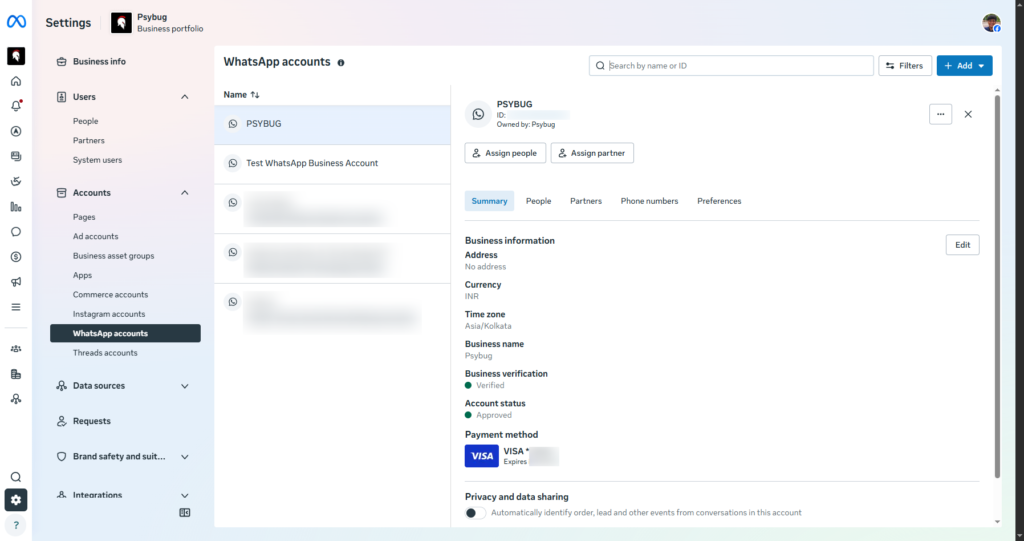
Step 2: Open WhatsApp Manager
Navigate to:
Business Settings → WhatsApp Manager
Select the phone number for which you want to reserve a username.
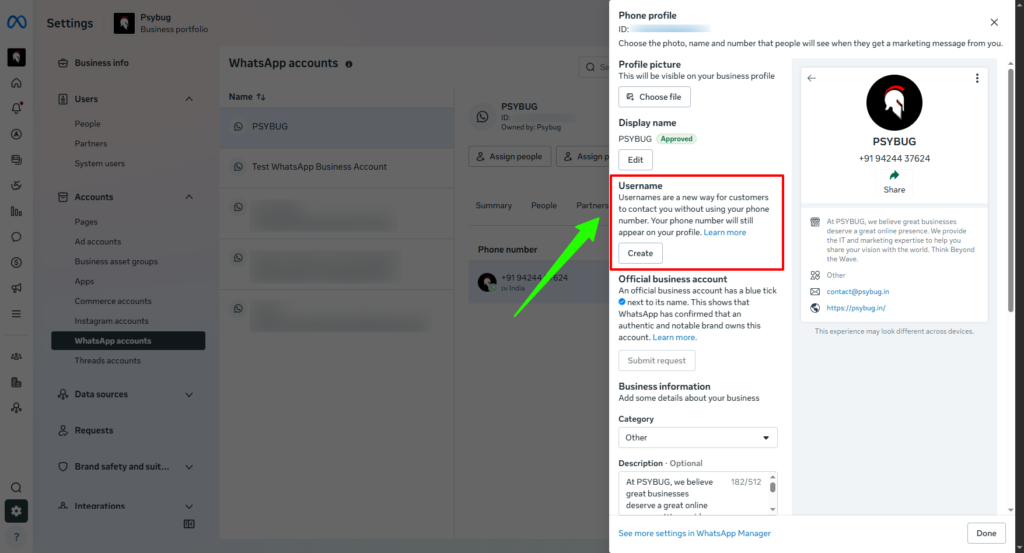
Step 3: Open the Profile Section
Inside your phone number settings, locate the Username section.
Click Claim Username.
Step 4: Enter Your Desired Username
Example:
psybug
or
sendpop
Click Submit.
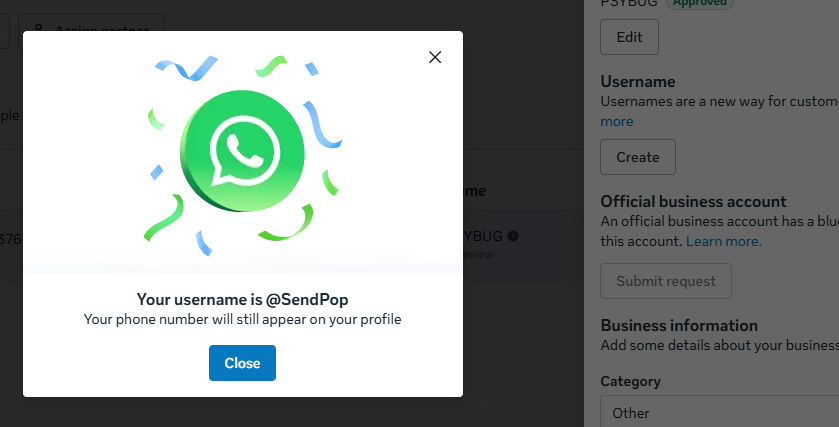
Meta reviews your username request.
Possible statuses include:
- Reserved
- Approved
- Rejected
Once approved, your username becomes active when Meta enables usernames in your region.
Method 2: Claim Username Using the Meta Graph API
Developers can automate username reservation directly through the Graph API.
- Click to view official Meta Business Usernames Documentation
Endpoint
POST /{PHONE_NUMBER_ID}/username
Example Request
{
  "username": "sendpop"
}
Successful Response
{
  "status": "reserved"
}
or
{
  "status": "approved"
}
Check Your Current Username
You can retrieve the username associated with your phone number.
GET /{PHONE_NUMBER_ID}/username
Example response:
{
  "username": "sendpop",
  "status": "approved"
}
Get Reserved Username Suggestions
Meta may reserve one or more usernames for your business.
Retrieve them using:
GET /{PHONE_NUMBER_ID}/username_suggestions
This often provides usernames with a higher likelihood of approval.
Common Errors and How to Fix Them
Username Already Taken (147001)
Problem
The username is already claimed or unavailable.
Solution
Choose another variation such as:
psybug_mediasendpop_apppsybuginc
Facebook Page Not Linked (147003)
Your Facebook Page already uses the requested username.
Solution
Link your WhatsApp Business phone number to the corresponding Facebook Page before trying again.
Instagram Account Not Linked (147004)
Your Instagram account already owns the username.
Solution
Connect your WhatsApp Business phone number to your Instagram account.
Username Already Exists on Another Business Number (147005)
The username belongs to another phone number within your Business Portfolio.
Use:
{
  "transfer_action": "force_transfer"
}
to move the username.
Best Practices
Choose a username that:
- Matches your brand name
- Is short and memorable
- Avoids unnecessary numbers
- Matches your Instagram and Facebook usernames
- Is easy to pronounce and spell
Good examples:
psybugsendpoptesla_supportspotify
Avoid:
company2026officialmybusiness123456bestcompany_india_official
Frequently Asked Questions
Does my phone number disappear?
No. Your business phone number continues to appear on your WhatsApp profile
Can I change my username later?
Yes. Meta allows businesses to change usernames, subject to availability and approval.
Can two businesses use the same username?
No. Each username is globally unique across WhatsApp.
Can I reserve multiple usernames?
No. Each business phone number can have only one active username at a time.
Do I need a verified business?
Verification is recommended but not always required. Businesses with higher messaging limits generally have a better chance of approval.
Final Thoughts
WhatsApp Business Usernames are a major improvement for branding on the Meta WhatsApp Business Platform. A memorable username makes it easier for customers to recognize your business, improves trust, and creates a consistent identity across WhatsApp, Facebook, and Instagram.
If you’re using the WhatsApp Business API, reserving your username early helps secure your brand before someone else claims a similar identity.
Whether you’re managing one business phone number or thousands through a SaaS platform, now is the right time to reserve your WhatsApp Business Username.